

The Advanced Reporting feature lets you build views and reports against project and other investment data to drive organizational intelligence. All customers upgrading to Release 14.2 that have no custom reports receive Advanced Reporting automatically. Advance Reporting has the following benefits for your users:
The Data Warehouse provides a schema that is optimized specifically for analytics. A set of CA Clarity PPM jobs extract, transform, and load the data from CA Clarity PPM to the Data Warehouse. The advantages of the Data Warehouse include:
The following diagram shows the flow of data from the CA Clarity PPM database to the Data Warehouse.
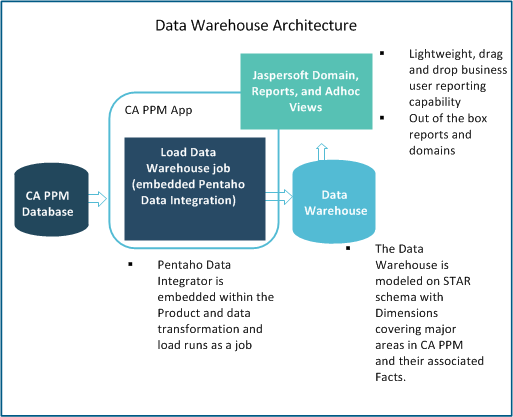
The Data Warehouse addresses several data and reporting challenges that users experienced when working directly with the CA Clarity PPM transactional database.
|
Challenge |
Response |
|---|---|
|
Reports run against transactional data |
The Data Warehouse has its own database which takes stress off the transactional CA Clarity PPM database. |
|
Complex relational database queries |
The data warehouse carries keys and descriptive values in the dimension tables so that fewer joins are required. Facts are combined into summary and period tables. |
|
Finding data with 1000+ tables |
Data Warehouse tables are user friendly for reporting (with the exception of configuration and meta tables). |
|
Table name inconsistencies |
Similar tables are grouped together by the table prefix, and the names are descriptive. |
|
Difficult time slice setup |
Specific time slices are set up to populate the data warehouse. Defaults are set but can be adjusted. |
|
Inconsistent column naming |
Columns are named consistently across tables. |
|
Resource ID versus |
Resource columns (manager_key, resource_key, and so on) are always the resource_key. In CA Clarity PPM, manager points to the user ID and the resource points to the resource ID or code, which is inconsistent. |
|
Date and time storage correctness |
The finish/end dates seen on the screen are dates in the data warehouse database. In CA Clarity PPM, a user must use a function to determine the date. For example: 12/31/2012 on the screen could be stored as 1/1/2013 00:00:00 in the CA Clarity PPM table. |
|
Use of Code versus ID |
The CA Clarity PPM financial tables use codes instead of IDs. The Data Warehouse always uses the numeric key of the dynamic lookups. |
|
Database tuning |
Because the Data Warehouse database is separate from the CA Clarity PPM database, it can be tuned differently for optimal performance. |
|
Studio attributes not available in a Universe without customization |
The data warehouse is extendable without customization. A flag was added to Studio objects and attributes that tells the load job to add new objects and attributes automatically. |
Advanced Reporting uses the Jaspersoft Studio application to manage views, reports, and dashboards. This third-party reporting option is integrated with CA Clarity PPM to provide easy reporting for users. Each report can be customized by selecting the domains and fields needed.
The Jaspersoft domains are a business representation of the Data Warehouse that lets you interact with data without having to understand database complexities. The Jaspersoft domains parallel and serve the same general purpose as the Business Objects Universes. The following figure shows how the Jaspersoft domains can be used to create reports in CA Clarity PPM.
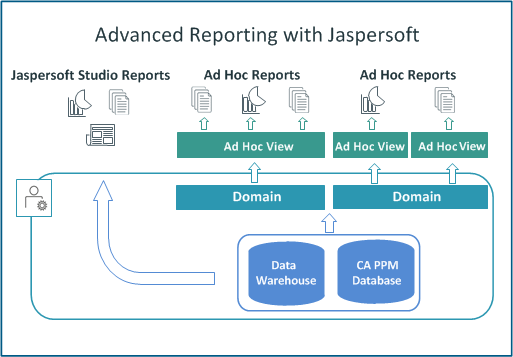
New or upgrading customers who are moving to Advanced Reporting (Jaspersoft) must adjust the CA Clarity PPM user interface and user access rights. Because the Business Objects reporting solution is still available for existing customers, the user interface reflects that option.
Upgrade Actions: Adjust the user interface and access rights to reflect that Jaspersoft and not Business Objects is the reporting option.
Actions for new and upgrading customers:
This access right makes the Reports tab under the Reports and Jobs link accessible to users. Because the reports listed there are Business Objects reports, the tab should not be visible to Jaspersoft users.
If you are a new customer, do not assign this access right to users.
If you are an upgrading customer, remove the access right from assigned resources or groups. An out-of-the-box Jaspersoft report that is named User Access Rights can provide the resources and groups with the right granted.
The following cases describe the way that CA Clarity PPM report-related fields set for Business Objects can affect a Jaspersoft user:
The following points apply to time slice requests that support the Data Warehouse:
Note: To view the list of Data Warehouse time slice requests, navigate to the Time Slices list page and sort on the Data Warehouse column.
Important! The entity must have Monthly (or 13 Period) fiscal time periods set up to cover the range of the time slice requests. Otherwise, the time slice requests are ignored when the Time Slicing job is run.
Note for upgrading customers: If the From Date and Number of Periods for the 15 existing time slice requests are set to cover a time range greater than the default time ranges, the upgrade does not update the time slices. The time slices are left as they were before the upgrade.
Important! If you edit these slice requests, set the From Date and Number of Periods to be the same for each slice period type. If these values are not set correctly, the data in the Data Warehouse will be inconsistent.
Specifically, follow these rules when setting the From Date and Number of Periods for the Data Warehouse time slice requests:
Note: This release contains only one daily time slice request.
Note: Although we ship fiscal time slice requests, this release contains no option to create new time slice requests with a slice period of fiscal. The only available fiscal time slice request functionality resides in the new slice requests shipped for the Data Warehouse.
To use the new fiscal slices and populate the PRJ_FISCAL_BLB_SLICES table after the upgrade or installation, follow these steps:
Specifies the entity that is used to determine fiscal periods. The fiscal periods that are associated with the selected entity are used for all Data Warehouse fiscal period data calculations. Setting the entity for the first time creates new Data Warehouse time slice requests. Therefore, the initial run of the Time Slicing job takes significantly longer than normal.
Initially setting an entity or updating it also updates the fiscal entity and fiscal period type for the Data Warehouse fiscal time slice requests. Do not set or change the entity when a time slice rollover is in progress. If you do, an error message appears. Wait until the rollover completes and then set the entity. To determine which slice requests are in the rollover, check the expiration date on the time slices. A slice request with an expiration date that is blank, earlier than the current date, or the same as the current date is in the rollover. Allow the slice request to complete processing before setting the entity.
Note: The entity must have Monthly (or 13 Period) fiscal time periods set up to cover the range of the time slice requests. Otherwise, the time slice requests are ignored when the Time Slicing job is run.
Note: For complete information about setting up and populating the Data Warehouse, see the Installation Guide.
|
Time Slice ID |
Time Slice Name |
|---|---|
|
55555 |
DAILYRESOURCETIMECURVE |
|
55556 |
WEEKLYRESOURCEACTCURVE |
|
55557 |
WEEKLYRESOURCEESTCURVE |
|
300 |
WEEKLYRESOURCEBASECURVE |
|
307 |
WEEKLYBASEASSIGNCOSTS |
|
55559 |
WEEKLYRESOURCEAVAILCURVE |
|
55558 |
WEEKLYRESOURCEALLOCCURVE |
|
306 |
WEEKLYRESOURCEHARDALLOC |
|
4 |
MONTHLYRESOURCEACTCURVE |
|
5 |
MONTHLYRESOURCEESTCURVE |
|
312 |
MONTHLYRESOURCEBASECURVE |
|
305 |
MONTHLYBASEASSIGNCOSTS |
|
7 |
MONTHLYRESOURCEAVAILCURVE |
|
6 |
MONTHLYRESOURCEALLOCCURVE |
|
55566 |
MONTHLYRESOURCEHARDALLOC |
|
55577 |
assignment::practcurve::dwh_fiscal |
|
55578 |
assignment::prestcurve::dwh_fiscal |
|
5004026 |
assignment::actcost_curve::dwh_week |
|
5004027 |
assignment::actcost_curve::dwh_month |
|
55584 |
assignment::actcost_curve::dwh_fiscal |
|
55576 |
assignment::etccost_curve::dwh_week |
|
55567 |
assignment::etccost_curve::dwh_month |
|
55589 |
assignment::etccost_curve::dwh_fiscal |
|
55588 |
baseline::current_assignment_usage::dwh_fiscal |
|
55587 |
baseline::current_assignment_cost::dwh_fiscal |
|
5004016 |
baseline::current_team_usage::dwh_week |
|
5004017 |
baseline::current_team_usage::dwh_month |
|
55582 |
baseline::current_team_usage::dwh_fiscal |
|
5004020 |
baseline::current_team_cost::dwh_week |
|
5004021 |
baseline::current_team_cost::dwh_month |
|
55581 |
baseline::current_team_cost::dwh_fiscal |
|
55579 |
resource::pravailcurve::dwh_fiscal |
|
55580 |
team::pralloccurve::dwh_fiscal |
|
55583 |
team::hard_curve::dwh_fiscal |
|
5004022 |
team::alloccost_curve::dwh_week |
|
5004023 |
team::alloccost_curve::dwh_month |
|
55585 |
team::alloccost_curve::dwh_fiscal |
|
5004024 |
team::hardallccost_curve::dwh_week |
|
5004025 |
team::hardallccost_curve::dwh_month |
|
55586 |
team::hardallccost_curve::dwh_fiscal |
|
Copyright © 2015 CA Technologies.
All rights reserved.
|
|